Benchmarks
Benchmark results from the example app, and methodology
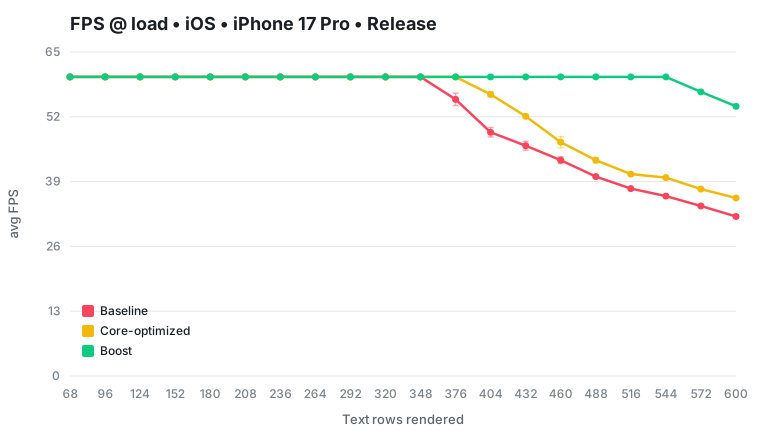
To show what React Native Boost buys you, the example app in the repository hosts a benchmark that renders a heavy, constantly-updating screen and measures the frame rate. We compare three configurations on the exact same device: the baseline (stock React Native), a core-optimized configuration that turns on any experimental feature flags in React Native that aim to do similar runtime work reductions as Boost (detailed below), and React Native Boost.
Higher frames per second (FPS) means a smoother UI. The ideal target is 60 FPS, which means you need to commit one new frame every ~16 ms. Once the app can't keep up, FPS drops and the interface starts to stutter.
Results
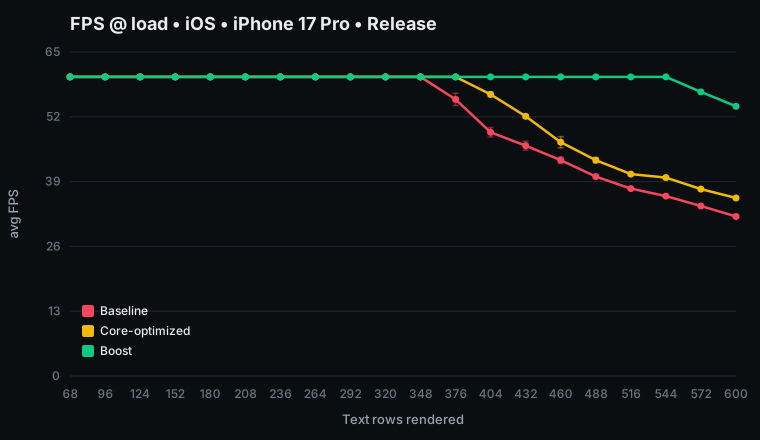
iOS: The baseline starts dropping frames early and falls to ~32 FPS under the heaviest load, while React Native Boost holds a solid 60 FPS far longer and stays roughly 69% faster at the top end. The core-optimized build (the middle line) recovers part of the gap, but Boost stays roughly 50% ahead of even that.
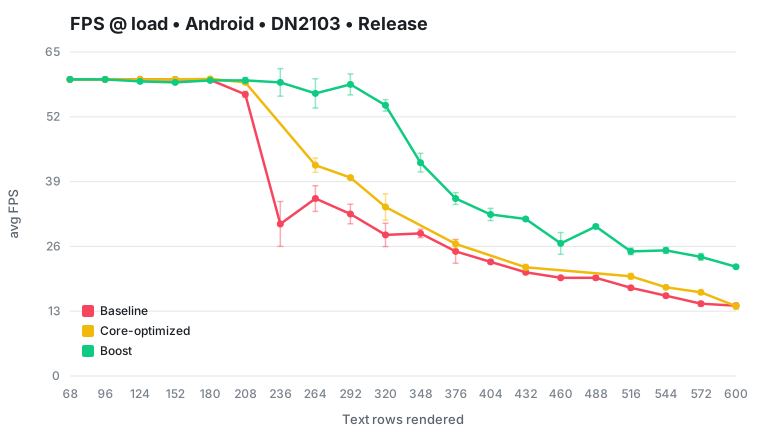
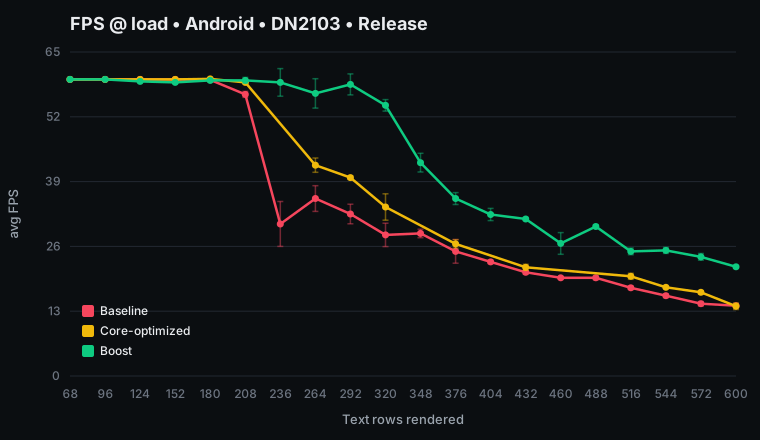
Android: Similar, with Boost about 55% faster at the heaviest load (and higher at intermediate heavy loads). The core-optimized build helps here too, but can't recover the whole gap. The load on the test device used is quite noisy, but Boost's lead is unambiguous.
Methodology
The test screen is a live crypto-style order book. It displays two stacked columns of rows, each
row a few pieces of Text, all updating many times per second from a simulated price feed.
Each run compares these identical inputs:
- One build, three configurations. From a single release build we run the baseline (stock React Native), a core-optimized configuration with any experimental performance optimization React Native feature flags enabled, and React Native Boost.
- Change the load. Each configuration steps through a wide range of row counts, from light to heavy.
- Not run into thermal throttling. Phones throttle as they heat up, which would corrupt the comparison. So before every capture the app idles until the device cools back to a fixed thermal floor.
- Measure FPS. The app records how long every frame takes over a fixed window, reporting the average FPS (plus 95th-percentile frame time and the share of dropped frames). Each point is captured several times and reported as the median, with the replicate spread drawn as error bars on the graphs above.
Everything runs as a release/production build on the New Architecture.
Secondary benchmarks
Number of React tree nodes
We're also making a second, device-independent measurement. For a single row, we count the React tree nodes (fibers). One of the ways React Native Boost impacts an app's performance is by deleting a layer of these fibers per element it optimizes.
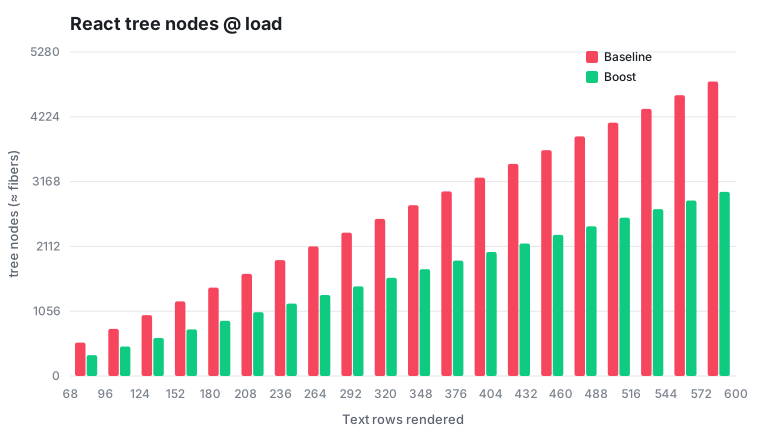
Fewer nodes means less for React to build and re-check on every frame.
Time-to-mount
For previous versions of React Native, we also published benchmarks showing heavy performance improvements in initial render (mounting) times. Text components optimized through React Native Boost rendered up to 50% faster on iOS, and around 20% faster on Android, compared to the baseline standard Text component.
Thanks to various improvements to the reconciler and other internals in React Native 0.78, this advantage has shrunken to only around ~4-6% in recent benchmarks. React Native Boost remains advantageous for frequently-updated screens, less so for screens with only a lot of static components.
reduceDefaultPropsInText feature flag in React Native
In React Native 0.82, a reduceDefaultPropsInText feature flag was introduced that reduced some of the default props being set in the JS wrapper component, similar to what Boost is doing. It has since graduated, meaning the optimized behavior is the default in newer React Native versions. It's one step in React Native's long-term goal of reducing the Text and View wrapper overhead directly in core.
// Additional note: Our long term plan is to reduce the overhead of the <Text>
// and <View> wrappers so that we no longer have any reason to export these APIs.
In our benchmark, the core-optimized series in the graphs enables reduceDefaultPropsInText (on the React Native version measured in this benchmark run, where the flag still exists and isn't enabled by default). Under heavy render load it recovers roughly 8–15% of the baseline's lost frame rate on iOS (a bit more on Android), but closes only part of the gap. NativeText, the component React Native Boost uses under the hood, stays well ahead. As React Native lands more of these optimizations, we expect the core-optimized line (and then the core line) to keep rising toward React Native Boost.